My Introduction to Kubernetes.
This is a tool for orchestrating containers in a containerized application running on one or many machines on the cloud or in hybrid situations. These containers are usually Docker containers, but Kubernetes can manage any container that follows the Open Container Initiative. A container is a standard unit of software where the code is packaged with all its dependencies and requirements so that the application runs smoothly even when the software is running in different environments.
As more applications became global, more companies adopted the microservices architecture instead of the monolithic architecture. This meant that there was a growing need for an orchestration tool to manage these increasingly complicated software architectures. Kubernetes was created by Google to solve that problem. Later, the application was open-sourced, where it quickly became one of the most popular container orchestration tools.
I like to think of a Kubernetes cluster as an orchestra that needs to follow the musical notes to create beautiful music, and Kubernetes is the orchestrator guiding each musician to play their parts in a way based on what is required, as well as adapting to any changes that may happen. You might think that as long as each musician can just practice their part and execute a predefined plan, all would be well. But things can change. Quickly. So, having a master organizer making sure the whole group can work together to perform music to a high standard is crucial.
For example, you could have a full-stack application called ShopSmart, which has a frontend web app, backend services, and a database. All these parts of the whole could be within a container along with the required dependencies. The container would be made to run on either a virtual or local machine.
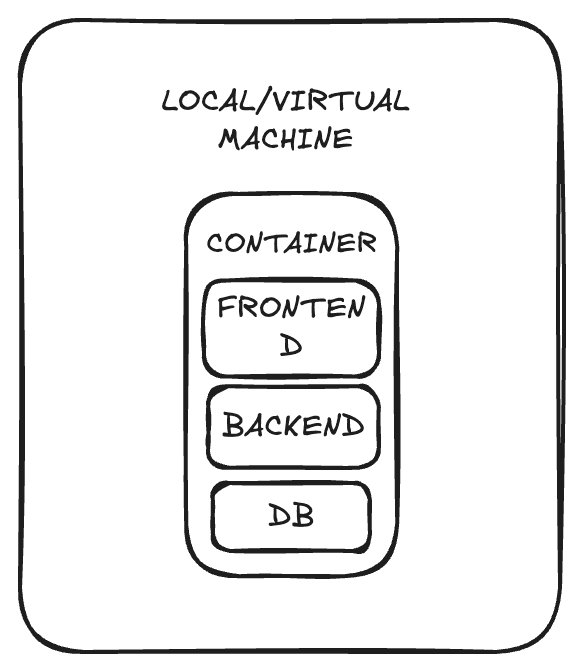
During development, it is likely that all that would be required would be a single container to handle all requests from only a handful of users. The infrastructure would easily handle the current load. After the launch of the full-stack application, the number of requests from users rapidly rises, and soon, the pod struggles to handle the large amount of load.
So you adapt to the rising load by horizontally scaling your application by increasing the number of replicas of your containers and connecting them to a load balancer so that the requests are shared among them efficiently.
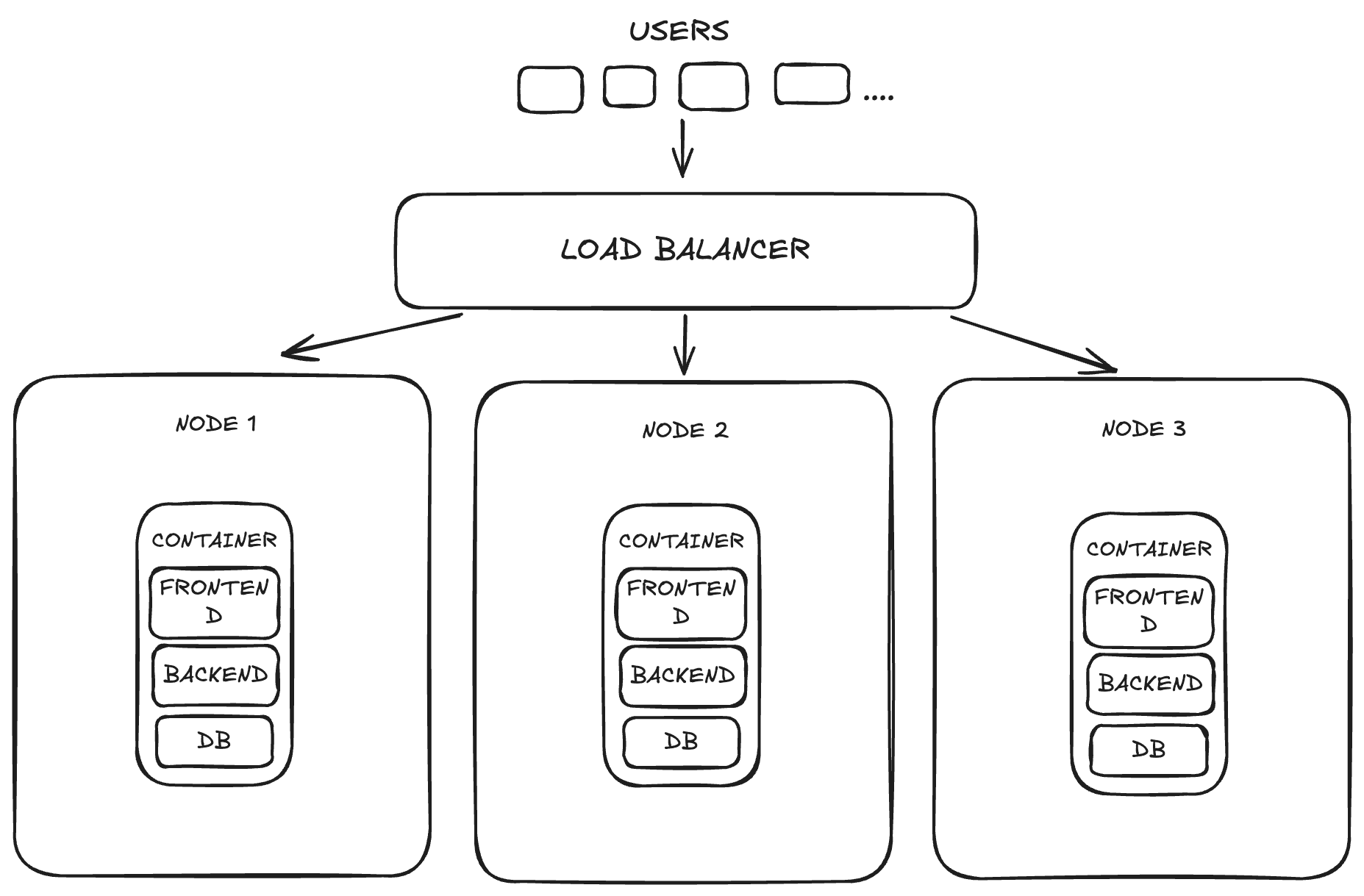
The infrastructure does get more complex and difficult to maintain, but at a reasonable load, it’s manageable. But then your e-commerce platform becomes extremely successful, and millions, if not billions, of users want to use it daily. At that sort of scale, it is hard to imagine how any company manages all that easily. A company could hire a large number of DevOps professionals, but crashes would be likely due to human error. Kubernetes helps solve this problem.
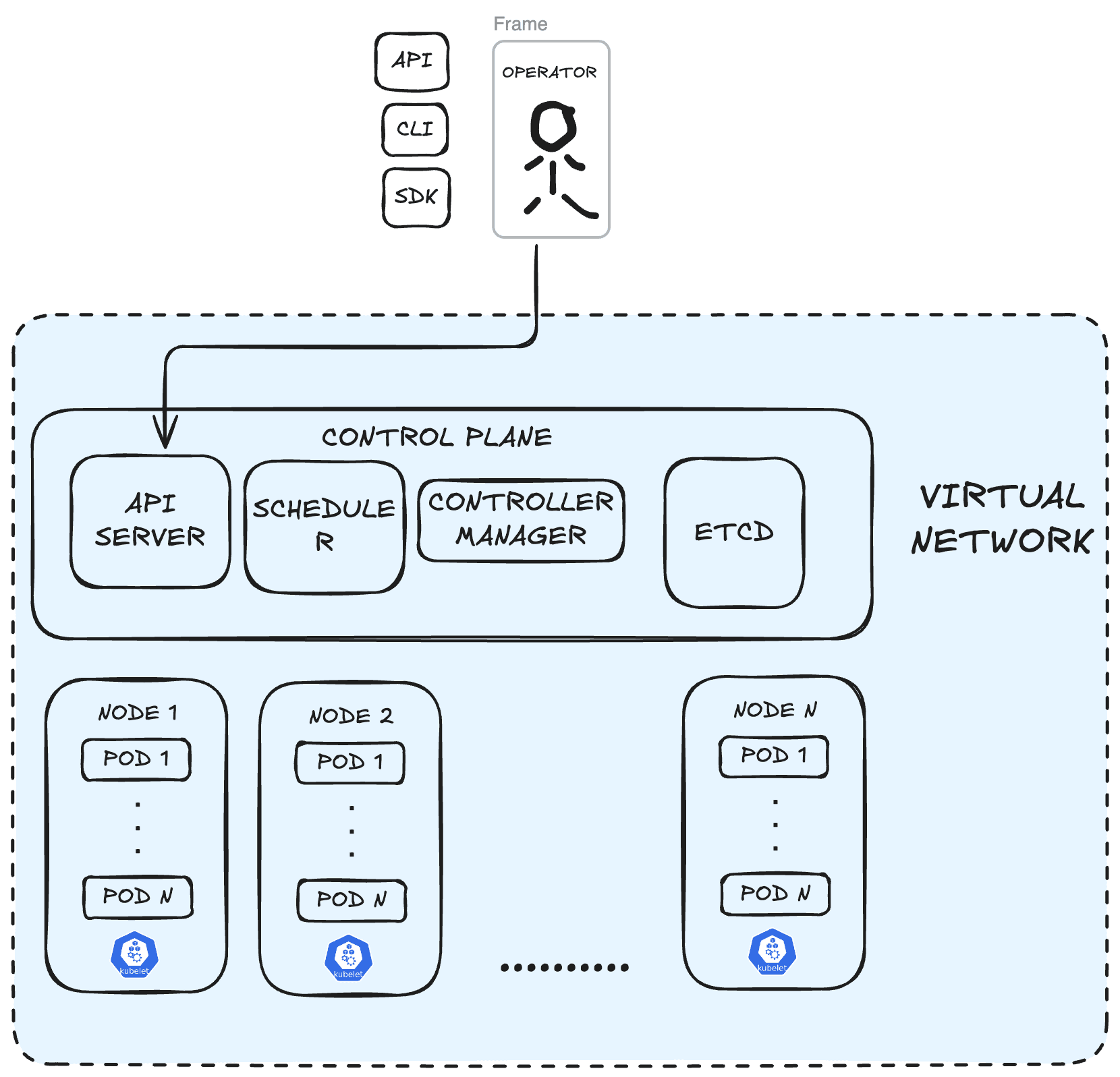
A Kubernetes cluster ( which is a single Kubernetes system unit) consists of a master node and many worker nodes.
Kubernetes can:
- Act as a load balancer by using Services to distribute load across different nodes.
- Act as an autoscaler that, based on defined rules, can increase or decrease the number of nodes running based on current load requirements.
Kubernetes is designed to be self-healing. It ensures a desired state of applications by restarting failed containers, replacing pods, and scheduling them on healthy nodes
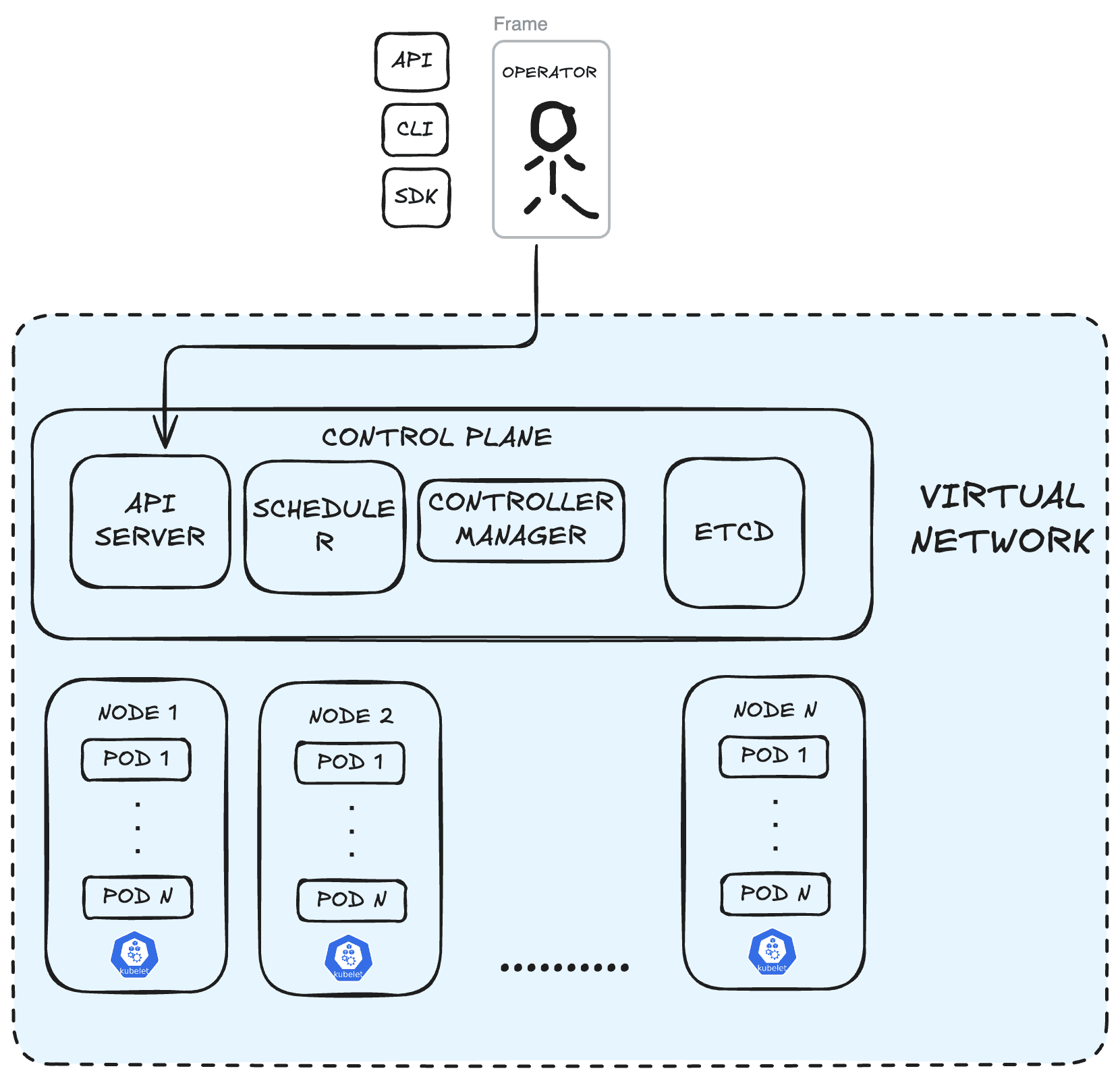
A node can be thought of as an abstraction over a physical or virtual machine that serves as a worker in a cluster, responsible for running containers. A node contains one or more pods. A pod is the smallest, most basic deployment unit in a cluster that acts as a wrapper over a containerized application.
You can have multiple master nodes in a cluster to ensure that one is always available in case there is a failure. The master node, also known as a control plane, contains some important components.
-
The API Server is the module that receives requests from the operator through API, CLI, or SDK and processes the request accordingly. The kubelet(node agent) constantly communicates with the API Server, sending health status reports, node registration, pod assignment, and status updates.
-
The Scheduler is responsible for scheduling the placement of containers on different nodes based on the required load and the available resources on the worker nodes.
-
The Controller Manager is vital for maintaining the operational integrity of the cluster. It ensures the cluster remains desired even during failures. It automatically handles the scaling of resources to ensure the workloads can adapt to changing demands.
-
ETCD Store can be thought of as the brain of the cluster. It stores the current state of the application along with all the configuration data for all parts of the cluster. It enables backup and restore as the state of the application is saved to the store as snapshots.
So, what would the Kubernetes cluster for our application look like then?
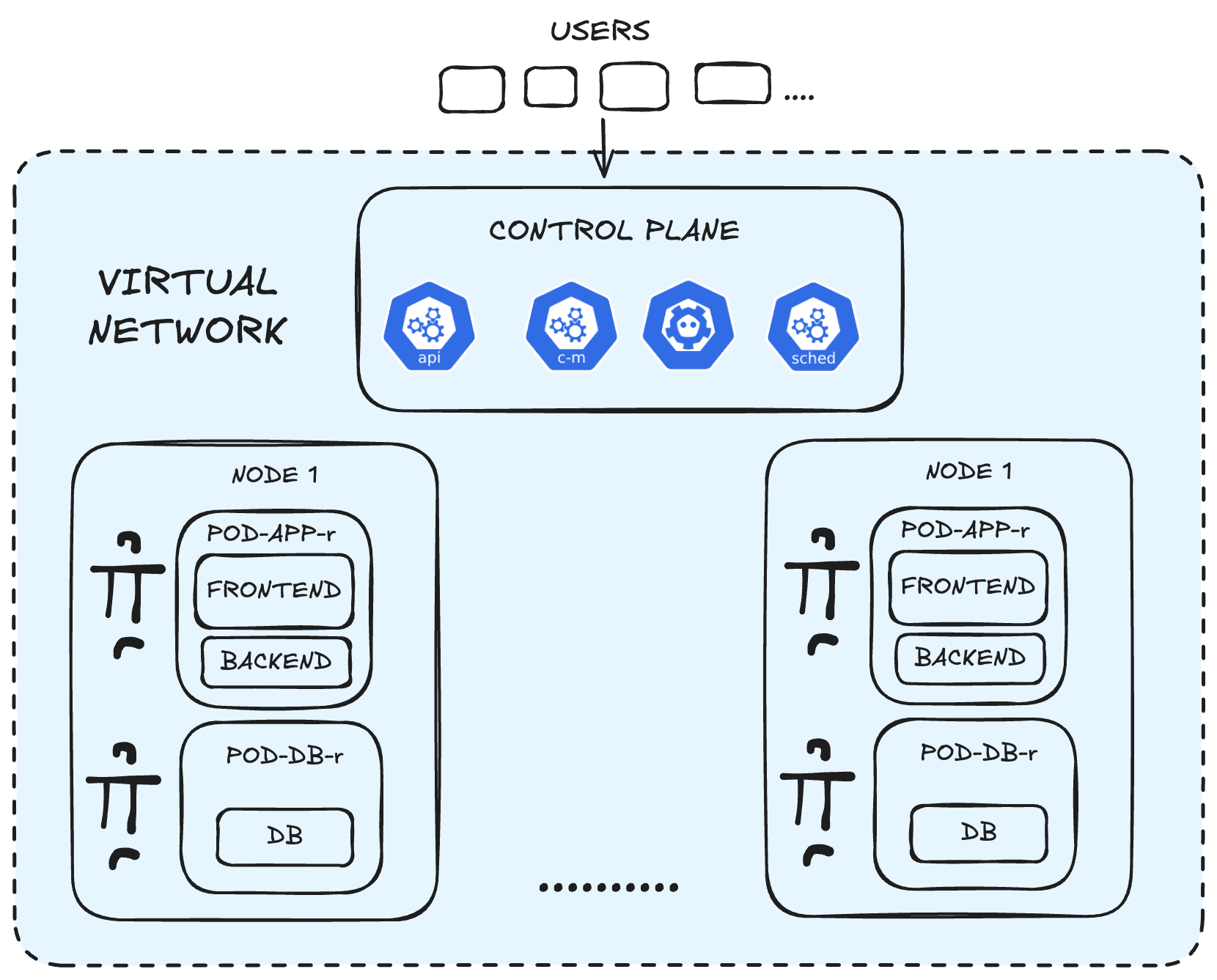
Now our architecture is being run in a cluster with a number of nodes, with a number of pods within them. The frontend and backend are being run in a single pod, which can be replicated depending on changing demands. But the database has been moved to its own separate pod. There is a sensible explanation for this. It is recommended that modules of the app should be in a pod only if they are:
- Tightly coupled
- Share a volume of data
- their lifecycles are tied together
- Share the same localhost
At this moment, it is better that the DB is not running in the same pod as the other modules. As the DB is the most critical aspect of the app. It works with access to the volume that stores the app data, and this volume is not needed by the other modules. The lifecycle of the other modules is significantly different from that of the DB container, as the database needs to have high availability. The database is stateful, so it is important that it has its own container and pod. You could even adjust the configuration of the deployments even further by considering more factors.
-
Independent scaling: The DB containers will need to be replicated based on the amount of database read/ writes required, and this means it has to be scaled differently from the app. Additionally, the frontend application usually does not require as much memory and CPU cycles as the backend, so it may not make sense to scale these modules the same. To save on resources, the two modules should be in separate pods.
-
Independent deployments: The frontend changes frequently, CSS rewrites/ HTML adjustments. Compare that with the backend, which changes a lot more infrequently. The DB would rarely be changed as the database needs to be highly available. The DB should not have to be restarted every time the frontend changes.
-
Fault isolation: If the backend crashes, the pod becomes unhealthy, so the frontend is restarted as well. Meaning the whole site would be available. At least the frontend could provide UI until the backend is back online. The same goes for the DB.
-
Separate security policies: The frontend serves static HTML, some CSS, and JavaScript. While the backend makes use of confidential secrets, if the pod is compromised from the frontend, it could be disastrous for the business if the backend and DB are accessed as well.
Now that we have considered more factors. The architecture would look more like this.
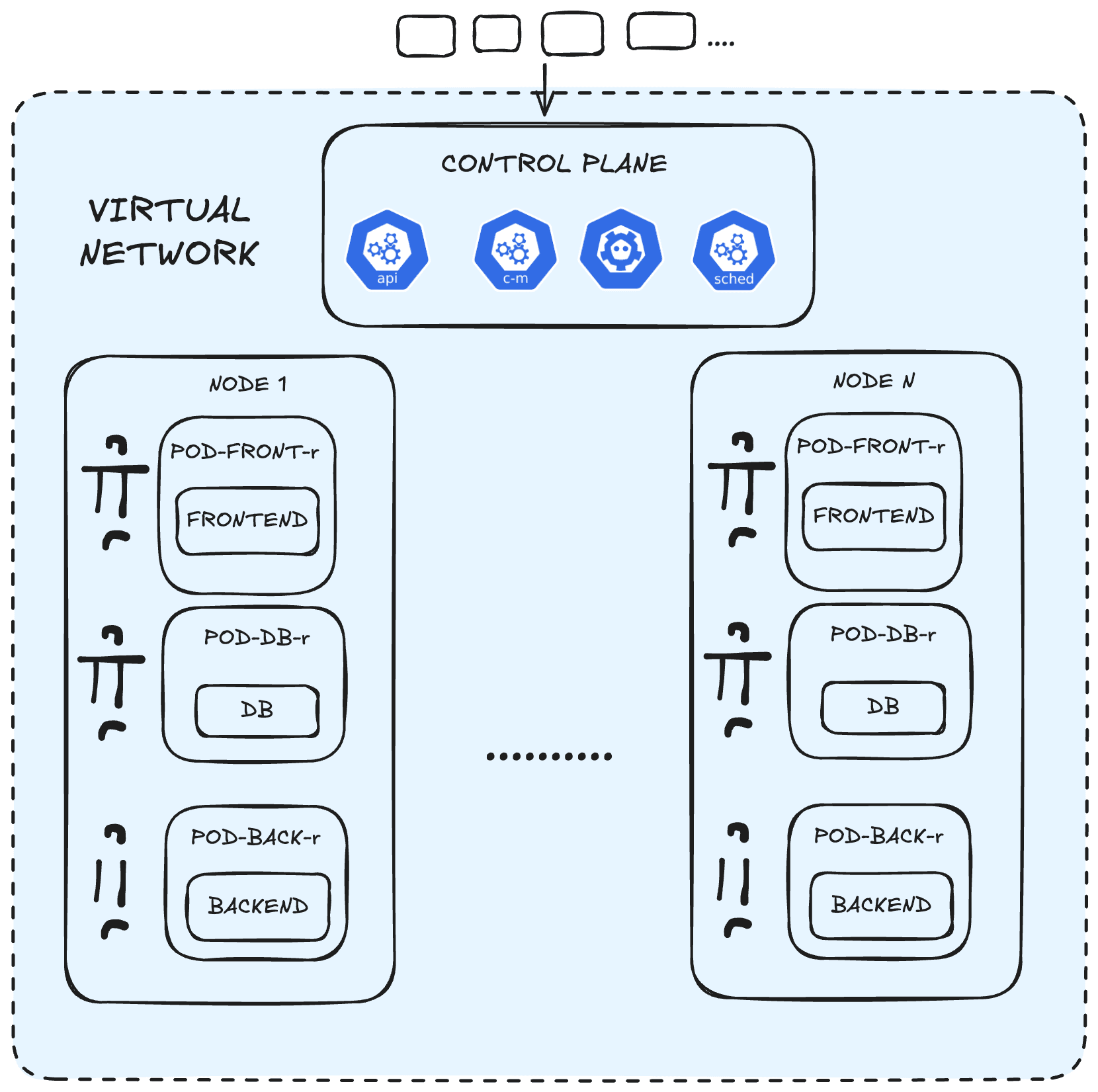
These are just ways the cluster can be adjusted based on changing considerations.
While Kubernetes gives us the tools to build more complex, robust, and scalable applications, it is still important to use our intuition when designing these systems. Also, not every application may need that much complexity. There is no need to rush towards a microservices infrastructure if your business does not require it. Added complexity means more resources and cost, and also a greater possibility for human error. A good understanding of the business requirements and how to apply that to system design is as important as the technical knowledge for a DevOps specialist.